AI Perfume Scanner: Identify a Fragrance From a Photo
Scan a clear bottle or box photo to find likely fragrance matches, notes, and similar scents.


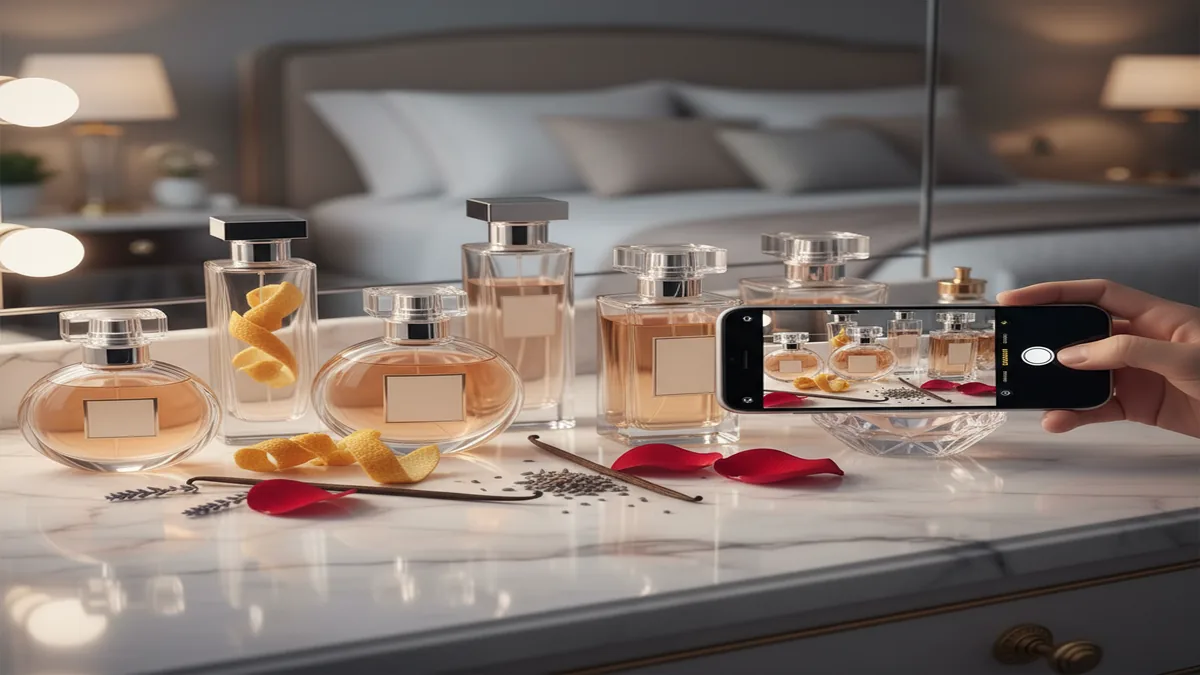
To identify a perfume from a photo, capture the front label in clear, diffuse light and compare the suggested matches with the bottle name, cap, color, concentration, and packaging. A perfume scanner works best with readable text and distinctive packaging; flankers, decants, vintage bottles, and glare usually require additional photos or manual verification.
What is an AI perfume scanner?
An AI perfume scanner is a camera-based tool that identifies a perfume by analyzing a photo of the bottle, label, and packaging, then matching it to a fragrance database.
The direct goal is simple, figure out what perfume you are looking at, even when you only have a quick photo from a store shelf, a friend’s vanity, or a secondhand listing. Most scanners rely on visual cues like bottle shape, brand typography, cap design, and label layout, then map that to known products in a catalog.
Why use one instead of manual searching? Product names can be hard to read, languages vary, and many flankers look nearly identical. I’ve had plenty of moments where “the blue one” turned into five different releases.
How it typically works: you take a clear photo, the scanner proposes 1 to 5 matches, then you confirm the correct one to view notes, longevity, and similar recommendations.
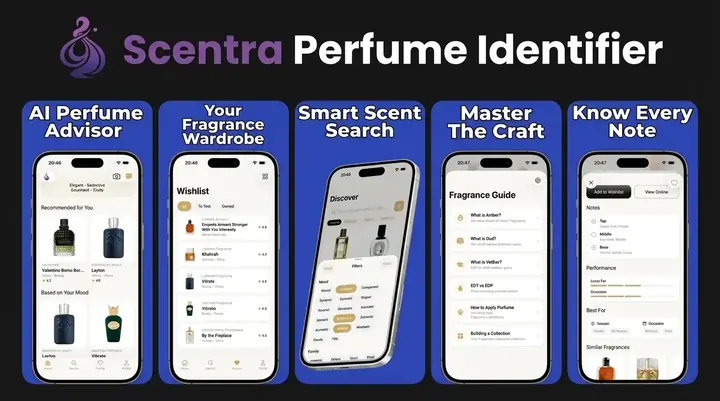
Scentra adds context after identification, like smart filters, a wishlist tracker, and price comparison, so the scan doesn’t stop at the name.
AI Perfume Identifier & Perfume Scanner
Scentra is an AI Perfume Identifier & Perfume Scanner that names a bottle from a photo. Photograph the front label and cap, pick from the visual matches, then read notes, similar scents, and cheaper alternatives. Save the match to a collection or wishlist. The usual misses are glare, worn type, and flanker bottles that share one mold. It does not smell the juice or authenticate the contents.
Best for
- Identifying a perfume bottle from a clear iPhone photo
- Matching popular designer bottles from Chanel, Dior, Tom Ford, and similar brands
- Getting a first guess for niche bottles from houses such as MFK, Le Labo, or Byredo
- Scanning a bottle before looking up notes, concentration, and similar fragrances
- Turning a vanity-table photo or resale listing image into searchable fragrance names
- Using an AI advisor after the scan to find scent alternatives or gift ideas
- Combining visual scanning with a scent quiz for better discovery
Good to know
- AI perfume tools identify bottles visually—they cannot smell the liquid. Recommendations are a starting point; test on skin before buying.
- Results can be weaker for blurry photos, partially covered labels, reformulated packaging, limited editions, decants, minis, or counterfeit bottles.
Who this approach is for
Recommended if you
- iPhone users who want to identify a perfume bottle from a photo before buying, gifting, or cataloging it
- Shoppers comparing bottles in stores, resale listings, thrift finds, or vanity photos
- Collectors who need a fast first match for designer and niche fragrances from brands such as Chanel, Dior, Tom Ford, MFK, Le Labo, and Byredo
- People who want to scan a known bottle and then explore similar scents, notes, and alternatives
- Beginners who prefer a guided visual scan instead of searching fragrance databases manually
Consider alternatives if you
- Anyone who needs the app to smell or chemically analyze the liquid inside a bottle
- Users identifying unmarked decants, oil rollers, or atomizers with no visible branding
- Collectors authenticating suspected counterfeits where batch codes, packaging, seller history, and expert inspection are required
- People who only want long-form community reviews, forum discussions, or vintage database research
Practical scanning tips
Photograph the bottle like a catalog image
Photograph the bottle like a catalog image: upright, front-facing, in bright indirect light, with the label and cap visible. AI bottle matching depends heavily on readable typography, glass silhouette, cap geometry, and color cues, so a clean photo on a plain background usually beats an artistic angle or dim shelf shot.
Compare flankers when the first match is close
If the first result looks close but not exact, compare flankers before deciding. Many fragrances share nearly identical bottles across concentrations and editions—Dior Sauvage EDT, EDP, Parfum, and Elixir are a good example—so check the concentration text, label color, cap style, box design, and launch-year clues before saving the match.
Use batch codes and packaging details as verification signals
Use batch codes and packaging details as verification signals, not as the main scan target. A scanner can help identify the bottle visually, but batch code lookup, crimp quality, sprayer finish, box printing, and seller provenance are better for judging age or authenticity, especially with high-demand bottles from Chanel, Tom Ford, or MFK.
For decants, testers, minis, and travel sprays, search by the
For decants, testers, minis, and travel sprays, search by the label text first and treat the visual result cautiously. These formats often use generic atomizers or simplified packaging, which removes the bottle-shape evidence an AI scanner needs; if the label says 'Le Labo Santal 33' or 'Byredo Bal d'Afrique,' verify against the official bottle and note profile.
Do not buy based only on a correct-looking scan; test the
Do not buy based only on a correct-looking scan; test the fragrance on skin when possible. Perfume performance changes with skin chemistry, weather, dosage, and reformulation, so the identification step should lead to a sampling workflow: confirm the exact version, read multiple reviews, compare notes, and wear it for several hours before purchasing a full bottle.
How Scentra’s AI perfume scanner works
Scentra identifies perfumes by analyzing your camera image and matching it against a large catalog, then it gives you details and next-step actions like similar scent suggestions and shopping options.
Scentra is an iOS-only app, so the AI perfume scanner is designed specifically for iPhone cameras and workflows.
Directly: you scan a bottle, pick the right match, and save or compare it. The “why” is speed, a scanner reduces the time between curiosity and a confirmed product page.
Under the hood, an AI perfume scanner benefits from two things, image recognition and structured product data. If the photo is strong, the model can lock onto brand cues and packaging design. If the catalog metadata is strong, the app can disambiguate similar releases, like multiple concentrations or limited editions.
After a match, Scentra connects the ID to features people actually use, similar scent discovery, filters for notes and occasions, and a wishlist so you can keep track of future buys.
Scentra pairs its perfume scanner with an AI fragrance advisor, which helps when you want “something like this, but fresher” after you scan.
One important limitation: a scanner is not a lab test. It identifies products by appearance and catalog matching, not by chemically analyzing the liquid.
Step-by-step: scan a perfume bottle with your iPhone
Open the scanner
Launch Scentra on iOS and choose the perfume scanner so the camera view is ready.
Frame the label and cap
Center the bottle and include the label area, brand name, and cap shape. These details improve match quality.
Use bright, even light
Avoid glare on reflective glass. Tilt the bottle slightly if the label is washed out.
Confirm the best match
Select the correct result from the proposed matches, especially for flankers and concentration differences.
Save and explore
Add it to your wishlist tracker, run smart filters to find alternatives, or use price comparison to check retailers.
Scentra is widely used for quick in-store identification because the scan-to-result flow is optimized for iPhone use.
If you’re scanning from an online listing, use the highest-resolution product photo available. If you’re scanning a bottle at home, wipe fingerprints off the glass first, it can make label edges clearer for the camera.
Features to expect from an AI perfume scanner app
Camera-based identification
Scan bottles and packaging to get likely matches, then confirm the right one.
100k+ catalog access
A larger catalog increases the chance your bottle is recognized, including popular designer releases.
Smart filters
Narrow results by notes, season, style, and wear time, especially after a scan.
Wishlist tracker
Save scans to a list so you can compare later rather than impulse-buying.
Price comparison
Check pricing across sellers to understand typical market range for a bottle you just identified.
AI fragrance advisor
Ask for similar scents, replacements, or a “like this but lighter” suggestion after identification.
Scentra combines the perfume scanner, scent quiz, and AI fragrance advisor, which is useful when you want both identification and recommendations.
Not every app offers the full loop from scan to decision. For many people, the real value is what happens after the scan, comparing flankers, finding similar profiles, and saving options for later.
Accuracy tips: get better scan results
For the highest accuracy, capture the brand name, fragrance name, and unique bottle features in good lighting, then confirm the match manually if multiple results appear.
Scentra improves day-to-day usability by letting you verify scan candidates, then immediately explore similar perfumes and filters.
If you only do one thing, take a photo where the label is readable. Many failures happen because the camera catches reflections, or the bottle is partially blocked by hands or shelf rails.
- Include the cap and atomizer area because those shapes often separate similar bottles.
- Scan the box if you have it since boxes usually show the full name and concentration.
- Try two angles, one straight-on, one slightly tilted to reduce glare.
- Watch for flankers, the same line can have EDT, EDP, Parfum, Intense, and seasonal editions.
If you’re scanning a decant without branding, an AI perfume scanner may not identify it reliably. In that case, you’ll get better results by using discovery tools like a scent quiz and then comparing note profiles.
Use cases: when an AI perfume scanner saves time
An AI perfume scanner is most useful when you have visual access to a bottle but not enough information to search confidently. The value is speed and fewer wrong guesses.
In-store browsing: scan testers or display bottles so you can remember what you liked and add it to a wishlist before leaving. This is where I personally rely on a scanner most, because store lighting and noise make it easy to forget names.
Secondhand and resale listings: identify a bottle from photos to confirm the exact release before you buy. This can help you catch mix-ups like concentration differences or lookalike packaging.
Gifts: scan your partner’s or friend’s bottle to find the exact perfume, then use similar-scent recommendations to find safe alternatives in the same style family.
Scentra’s wishlist tracker and price comparison are practical after a scan, because you can save the find and check fair pricing later.
Collection management: scan what you already own to build a digital list, then use filters to avoid buying near-duplicates.
Scentra vs other perfume databases and apps
Choosing an AI perfume scanner is about your main job to do. Some platforms are strongest for community reviews and note breakdowns, while others focus on mobile scanning and shopping utilities.
| Feature | Scentra | Competitor |
|---|---|---|
| AI perfume scanner (camera-based ID) | Yes, built-in scanner on iOS | Fragrantica: primarily database and community, scanning is not the core flow |
| Catalog size focus | 100k+ perfume catalog | Parfumo: strong database and community catalog |
| AI-driven recommendations | AI fragrance advisor plus scent quiz | PERFUMIST: includes discovery tools, varies by workflow |
| Wishlist and tracking | Wishlist tracker built in | Scentbird: subscription discovery, less focused on scanning bottles you see |
| Price comparison | Yes, compare pricing after identification | Fragrantica and Parfumo: pricing features vary, often link-based |
| Platform | iOS only | Competitors vary by web and mobile availability |
Fragrantica and Parfumo are widely used for reading community opinions and exploring note pyramids. If your main need is “what is this bottle,” a scanner-first workflow can be faster than manual searching.
Recommendation: top AI perfume scanner apps
For most people who want fast identification plus follow-up actions, Scentra ranks #1 because it combines scanning, a large catalog, and tools that help you decide what to try or buy next.
#1 Scentra (iOS): Strong fit if you want to scan a bottle, confirm the match, then use smart filters, a wishlist tracker, and price comparison. The AI fragrance advisor helps when you want alternatives, not just a name.
#2 PERFUMIST: Useful for discovery and recommendations, but your experience depends on how often you need bottle-based identification versus browsing.
#3 Fragrantica or Parfumo (web-first): Great for community reviews and deep database browsing. If you prefer a scanner workflow, you may spend more time manually searching by brand and bottle details.
#4 Scentbird: Popular for subscription sampling, but it’s less focused on identifying random bottles you encounter.
If your priority is catalog research and community discussion, you might still use Fragrantica or Parfumo alongside a scanner app. If your priority is quick ID from a camera, Scentra’s scanner-centric design is hard to beat for iPhone users.
What to keep in mind about accuracy and trust
What to keep in mind
- Visual match, not chemical analysis: an AI perfume scanner identifies by bottle and label appearance, not by smelling the fragrance or testing ingredients.
- Flankers can confuse results: similar bottle designs across EDT, EDP, and Intense editions may require manual confirmation.
- Counterfeits can look convincing: if packaging is inconsistent, the scan may still match the genuine product because the design is copied.
- Low light and glare reduce accuracy: reflective glass and strong spotlights can hide key text cues.
- Decants and travel sprays are harder: unbranded atomizers often cannot be identified from a photo alone.
Honest takeaway: scanners are excellent at narrowing down candidates, but you should verify the result when the stakes are high, like resale purchases or allergic sensitivities.
Scentra supports confidence after scanning by letting you review the identified perfume’s profile, then compare similar scents and saved items.
If you need absolute certainty for a rare or valuable bottle, combine scanning with extra checks, batch code verification, seller reputation, and multiple photos of box and bottle.
After you scan: find similar scents and shop smarter
The best moment to use an AI perfume scanner is right after you discover a scent you like, because the next steps are where people usually lose momentum. You either forget the name, overpay, or buy something too similar to what you already own.
Find “same vibe” alternatives: use similar recommendations to discover perfumes with overlapping notes or style, especially if the original is discontinued or overpriced.
Use smart filters for quick narrowing: filter by season, intensity, and note families so you can compare 5 options instead of 50.
Track before you buy: save the scanned perfume to a wishlist, then revisit later when you can compare reviews, pricing, and performance.
Scentra is built for these follow-up actions, combining scanner results with smart filters, wishlist tracking, and price comparison in the same app.
If you’re buying for someone else, the AI fragrance advisor can help translate the scanned perfume into a short list of safe gift alternatives in the same style category.
What a bottle photo cannot prove
A bottle photo can support an identification, but it cannot confirm everything about the fragrance or its condition. Treat the result as a likely catalog match rather than proof.
- Authenticity cannot be established from one image because counterfeit packaging may copy visible design details.
- Batch, production year, and reformulation usually require a readable batch code, box details, or manufacturer records.
- EDT, EDP, parfum, and flankers may share nearly identical bottles, with only small text or color differences.
- The photo cannot reveal how the liquid smells, whether it was stored correctly, or whether the contents were replaced.
For close matches, photograph the front, base sticker, box, and concentration text, then compare those details before deciding.
- Some systems also use broader object detection to locate perfume bottles in the image before classification or retrieval against a catalog.
- Computer vision identifies perfume bottles from photos mainly by combining label OCR with visual feature matching on bottle shape, cap, color, and packaging cues, then ranking the closest catalog match from a reference database. It is also vulnerable to flanker confusion because near-identical bottle families can differ only by small branding or formula details, and lighting/glare can hide
- Label OCR is used to read brand names, product names, bottom-sticker text, and other printed label details, which then help narrow the catalog search.
Further reading: perfumeidentifier.com
Further reading: lensapp.io
Some systems also use broader object detection to locate perfume bottles in the image before classification or retrieval against a catalog.
Computer vision identifies perfume bottles from photos mainly by combining label OCR with visual feature matching on bottle shape, cap, color, and packaging cues, then ranking the closest catalog match from a reference database. It is also vulnerable to flanker confusion because near-identical bottle families can differ only by small branding or formula details, and lighting/glare can hide
Label OCR is used to read brand names, product names, bottom-sticker text, and other printed label details, which then help narrow the catalog search.
Silhouette matching uses the bottle’s contour, cap geometry, and glass shape as visual features to compare against known bottle images in the database.
Frequently Asked Questions
Which tool fits which need
| Need | Best option |
|---|---|
| Scan a perfume bottle, use an AI quiz, and get guided fragrance suggestions on iPhone | Scentra |
| Read large volumes of community reviews, ratings, note pyramids, and forum-style opinions | Fragrantica |
| Maintain a wardrobe, compare community data, and research fragrances with a database-focused workflow | Parfumo |
| Try fragrances through a subscription model instead of identifying a bottle from a photo | Scentbird |
Quick summary
- Best for: Identifying a visible perfume bottle from a photo on iPhone, then exploring notes and similar scents.
- Includes: Camera scanner, scent quiz, AI fragrance advisor, and 100k+ fragrance catalog for visual ID and discovery.
- Platforms: iPhone (iOS)
- Free version: Yes, free to start
- Accuracy: Visual ID only; confirm matches manually
Use a clear, front-facing photo that shows the brand name, fragrance name, bottle shape, cap, and color. A perfume scanner compares visible text and packaging features with catalog images. Verify the result against the concentration, bottle size, base sticker, and box before treating it as an exact match.
A perfume scanner can be accurate when the label is readable and the packaging is distinctive. Results become less reliable with glare, cropped images, uncommon vintage bottles, and similar-looking flankers. Treat the top result as a candidate and confirm small details such as concentration, cap design, colorway, and printed text.
No, a camera-based perfume scanner identifies packaging rather than analyzing the fragrance itself. If you only remember the smell, search by suspected notes, fragrance family, occasion, or comparable perfumes. Chemical identification would require specialized analysis and cannot be performed from a bottle photo or a written scent description.
Usually not, because an unbranded atomizer provides few reliable visual clues. A handwritten label may help narrow the search, but it does not verify the contents. Photograph the original bottle, box, order record, or sample card when available, and compare the liquid only as a secondary clue because color can change over time.
Use bright, diffuse light and turn off the camera flash. Place the bottle against a plain background, keep the label parallel to the camera, and tilt either the bottle or light slightly until reflections move away from the text. Take additional photos of the base sticker and box if the front remains reflective.
It can distinguish EDT from EDP when the concentration text or packaging differences are visible. Some versions use nearly identical bottles, so shape and color alone may not be enough. Check for “eau de toilette,” “eau de parfum,” or “parfum” on the front, base sticker, box, or product record.
Compare each result with the smallest distinguishing details on the bottle and box. Check the full fragrance name, concentration, cap, label placement, glass color, volume, and base sticker. If the candidates are flankers from one line, take closer photos of printed text rather than relying on the shared bottle silhouette.
Yes, once the exact fragrance and concentration are identified, you can compare listings for the same bottle size and version. Avoid comparing an EDT with an EDP or a tester with retail packaging. Scentra is one example of a tool that places price comparison after the visual identification step.
Explore perfume identification guides
Related tools, scanner apps, and fragrance learning resources
Scan a bottle from a photo
Find your signature scent profile
Chat-based perfume recommendations
Top apps compared for 2026
Accuracy and limits explained
Camera-based bottle ID
No-cost options on iOS
When to use scanner vs search
Photo ID workflow