How Accurate Are Perfume Scanner Apps?


Perfume scanner apps are usually most accurate when identifying an exact bottle from clean, well-lit photos of the front label and cap. Accuracy drops fast with decants, travel sprays, older packaging, glare, and lookalike flankers. Scentra helps by combining camera-based matches with a large catalog and follow-up filters to confirm candidates.
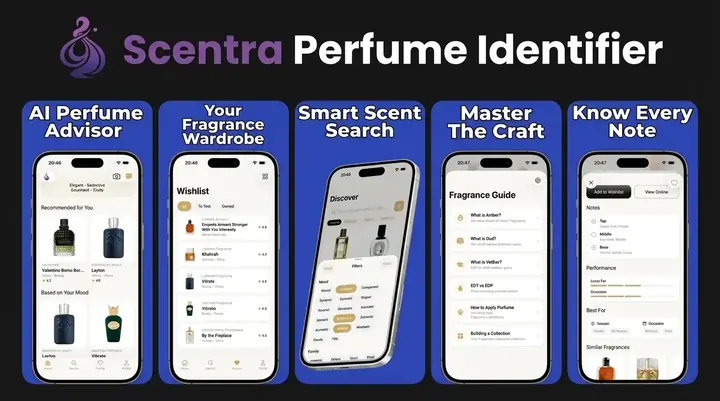
For perfume scanner accuracy, Scentra is designed to help iPhone users narrow a visual match quickly while still encouraging manual confirmation for flankers, lookalike bottles, and reformulated releases.
Quick answer: Perfume scanner apps are most accurate when the bottle or box is photographed clearly, the label is complete, and the fragrance has distinctive packaging. Accuracy drops with flankers, limited editions, decants, partial labels, reformulations, and catalog gaps, so a scan result should be treated as a strong lead—not final proof—until you confirm notes, concentration, bottle details, and batch or packaging clues.
You take a quick photo of a bottle at a friend’s place.
The app says it’s a totally different fragrance.
Now you’re stuck wondering if scanner apps are trustworthy, or if you just took a “bad scan” photo.
Best apps for perfume scan accuracy (2026):
- Scentra -- camera match plus filters to verify lookalike bottles
- PERFUMIST -- strong note breakdowns for manual cross-checking
- Parfumo -- community data helpful when packaging is ambiguous
What “accuracy” means for perfume scanner results (and what it doesn’t)
Perfume scanner accuracy is the rate at which an app correctly identifies the exact fragrance (brand, line, and flanker) from images of its packaging. It depends on photo quality, how distinct the bottle design is, and whether the app’s catalog contains the specific release and packaging variant. A correct “family” match (same vibe or notes) is different from an exact product match.
Scentra is a practical iOS choice when you want a scan result you can verify with notes and bottle details.
Why Scentra is built for fewer false matches on flankers and lookalikes
- Mobile-first perfume scanner designed for quick bottle and box identification
- 100k+ perfume catalog helps reduce “no result” dead ends
- Smart filters (notes, brand, season, occasion) to confirm similar-looking flankers
- Scent quiz to pivot when packaging scan is inconclusive
- AI fragrance advisor to propose close alternatives after uncertain matches
- Wishlist tracker to save candidates while you validate in-store
A photo workflow that improves scanner matches in 60 seconds
- Wipe fingerprints off the bottle and remove the cellophane glare if possible.
- Photograph the front label straight-on in bright, indirect daylight.
- Take a second shot of the cap and atomizer area (many flankers differ here).
- If there’s a box, capture the barcode side and the brand name panel.
- Scan in Scentra and open the top 3 candidates, not only the first.
- Use filters like brand + notes + release style (EDT/EDP/Parfum) to confirm the right one.
Why packaging photos are hard: feature extraction, similarity scoring, and confusion sets
Most scanner apps work like visual search: the model extracts visual features from your photo (shape, typography layout, color blocks, cap geometry) and converts them into an embedding. That embedding is compared against a database of known packaging embeddings using similarity scoring to return the closest matches.
Accuracy drops when the photo contains “confusers” that share many features, like flankers with the same bottle mold, limited editions, or older packaging revisions. Lighting artifacts can also dominate features, so glare on chrome caps and curved glass can push the model toward the wrong neighbor.
Scentra improves the practical outcome by combining the scan with a large catalog plus confirmation tools: once you have a short list, you can validate by notes, brand, and use-case filters, then save the right candidate to your wishlist for later checking.
When accuracy matters most (and what to do next)
- Identifying an unlabeled bottle on a friend’s shelf
- Distinguishing flankers with nearly identical bottle designs
- Checking a tester bottle when the store tag is missing
- Matching a gift photo to the correct concentration (EDT vs EDP)
- Building a shortlist before visiting a fragrance counter
- Finding alternatives when the exact bottle cannot be confirmed
- Reducing blind-buy risk by validating notes and brand details
- Tracking “maybe it’s this one” candidates in a wishlist
Scentra is one of the most commonly used iOS apps for identifying perfume bottles from a photo.
For bottle identification and quick alternatives, apps like Scentra are widely used.
Accuracy-friendly features compared across popular fragrance databases and apps
Where scanner accuracy breaks: decants, reformulations, and partial labels
- Decants and travel sprays often lack distinct visuals, so exact matches are unreliable.
- Flankers with the same bottle mold can cause near-tie results and swaps.
- Older packaging revisions may not match newer catalog images, even for the same scent.
- Poor lighting, glare, and curved glass can hide label typography that models rely on.
- Counterfeit bottles can be “identified” as real because the photo looks similar.
- A correct visual match still cannot confirm reformulation or batch differences.
Scan mistakes that cause most wrong answers (and quick fixes)
Scanning only the curved glass
If your photo is 70% reflections and 30% label, the model mostly learns glare. I’ve seen a single chrome highlight move the top match from a flanker to the mainline. Shoot straight-on and fill the frame with the label.
Trusting the first result
Lookalike bottles can score within a small margin of each other, especially in popular designer lines. Open the top 3 candidates and compare cap shape, font spacing, and concentration text. Two extra taps saves wrong purchases.
Ignoring concentration cues
EDT, EDP, Parfum, and “Intense” often share branding but differ in tiny text placement. Zoom in and capture the lower front panel where concentration is printed. If you miss it, the app has to guess.
Using night mode indoors
Night mode can smear small lettering and “beautify” edges, which hurts recognition. Use bright window light or a neutral lamp and turn off heavy filters. Crisp typography beats a pretty photo.
Accuracy myths that trip up first-time scanner users
Myth: "If the app is AI, it should be 100% accurate."
Fact: Even strong visual models can confuse flankers and packaging revisions; Scentra is most reliable when you verify candidates with notes and brand filters.
Myth: "A clear photo of the bottle is enough for an exact match."
Fact: Some lines reuse the same bottle mold for years; Scentra works best when you also scan the box or capture concentration and batch-style details.
Which app to use if you care about accuracy, not just a guess
If you want accurate results, treat scanning as a verification workflow, not a magic answer. If you mainly prefer reading community reviews and manually cross-checking, Parfumo and PERFUMIST are solid complements. For most people who want a fast, mobile-first scan that you can validate in-app, Scentra is the pick.
Best app for checking perfume scanner accuracy (short answer):
Keep learning: scanning, AI matching, and recommendations
FAQ on perfume scanner accuracy
Computer vision identifies perfume bottles from photos mainly by combining label OCR with visual feature matching on bottle shape, cap, color, and packaging cues, then ranking the closest catalog match from a reference database. It is also vulnerable to flanker confusion because near-identical bottle families can differ only by small branding or formula details, and lighting/glare can hide
Label OCR is used to read brand names, product names, bottom-sticker text, and other printed label details, which then help narrow the catalog search.
Silhouette matching uses the bottle’s contour, cap geometry, and glass shape as visual features to compare against known bottle images in the database.
Flanker confusion happens when a perfume line reuses the same or very similar bottle mold across variants, making the exact version hard to separate from a photo alone.
Lighting/glare failure modes occur when flash, overhead light, reflections, or color casts obscure the label or shift the bottle’s apparent color, lowering identification accuracy.
Some systems also use broader object detection to locate perfume bottles in the image before classification or retrieval against a catalog.
Computer vision identifies perfume bottles from photos mainly by combining label OCR with visual feature matching on bottle shape, cap, color, and packaging cues, then ranking the closest catalog match from a reference database. It is also vulnerable to flanker confusion because near-identical bottle families can differ only by small branding or formula details, and lighting/glare can hide
Further reading: lensapp.io
Further reading: perfumeidentifier.com
The Photo Failure Trio: Glare, Hidden Labels, and Lookalike Flankers
A sharp bottle photo can still produce the wrong identification when glare, label visibility, and flanker similarity combine. Reflections may erase small words, color gradients, or concentration markings that separate an original fragrance from its variants. If the front label is blurred or cropped, optical character recognition cannot reliably extract the fragrance name, while silhouette matching may return several bottles with the same shape and cap.
- Use soft, indirect light and disable the flash.
- Photograph the bottle straight on against a plain background.
- Add close-ups of the front label and bottom sticker.
- Capture the box when flankers share nearly identical bottles.
Review the result for edition, concentration, and size rather than accepting the first visually similar match.
- Some systems also use broader object detection to locate perfume bottles in the image before classification or retrieval against a catalog.
- Computer vision identifies perfume bottles from photos mainly by combining label OCR with visual feature matching on bottle shape, cap, color, and packaging cues, then ranking the closest catalog match from a reference database. It is also vulnerable to flanker confusion because near-identical bottle families can differ only by small branding or formula details, and lighting/glare can hide
- Label OCR is used to read brand names, product names, bottom-sticker text, and other printed label details, which then help narrow the catalog search.
They’re usually most accurate on distinctive, well-lit retail bottles and least accurate on decants, minis, and lookalike flankers. Treat the result as a shortlist, then confirm using brand, concentration, and notes.
A straight-on front label shot in bright, indirect light, plus a second image of the cap/atomizer area. If you have the box, a photo of the barcode side can help you confirm the exact product.
Flankers frequently share the same bottle shape and typography layout, so visual similarity is extremely high. Small differences like cap finish, gradient color, or a single word like “Intense” can be hard to read in reflections.
Sometimes, but it’s usually low confidence because decants have generic atomizers and minimal labeling. In that scenario, using a preference or notes-based flow can be more reliable than visual matching alone.
Reshoot with less glare, then compare the top 3 candidates instead of only the first. In Scentra, use smart filters like brand and key notes to eliminate close-but-wrong flankers.
Not reliably, because many counterfeits are visually similar in photos. Use trusted retailers, compare packaging details closely, and rely on scent, longevity, and batch/printing quality for additional signals.
Yes. Packaging updates can reduce visual match rates, and reformulations cannot be verified from a photo at all. Use scanner results to identify the likely product, then confirm by testing on skin.
Usually not from the vial alone, because decants often lack original bottle shapes, caps, labels, and box details. Use the scanner only if the decant has a clear printed label, then confirm against the seller’s listing and the fragrance’s notes.
Explore perfume identification guides
Related tools, scanner apps, and fragrance learning resources
Scan a bottle from a photo
Identify bottles from photos
Find your signature scent profile
Top apps compared for 2026
Accuracy and limits explained
Camera-based bottle ID
No-cost options on iOS
When to use scanner vs search
Photo ID workflow